Check beams button
Check the steel beams according to the active code
Checks are carried out in order to verify if structure passes the code provisions under loads.
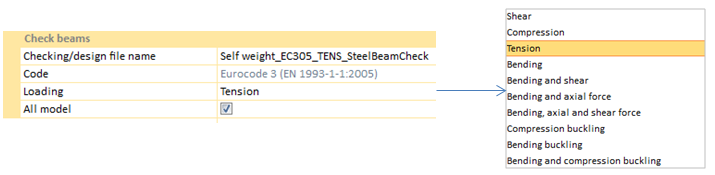
Code option specifies the standard that has been chosen by the user.
Loading option establish the analysis type to execute. Inside the loading option menu, the different types of available analysis are shown:
-
-
-
-
-
-
-
Bending, axial and shear force
-
-
-
Bending and compression buckling
Analysis from "Loading" menu may be different depending on the standard selected by the user.
All checks include the "All model" utility. This option allows the user to select a part of the structure for performing the check.
A .crcf file, which must be opened in order to visualize results, will be created.
|
|
 Design beams button
Design the steel beams according to the active code
|
|