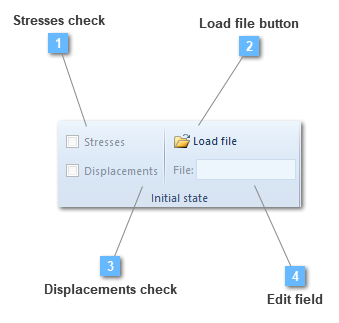
CivilFEM allows the user to enter initial conditions, stresses and displacements before solving.
This option is useful to perform an analysis after an initial stress state has been applied before the working load.
The user has two options for defining the initial stress state: Using a previously generated T16 Marc Output file, or using a custom TXT (text) file previously created by the "Generate a TXT results file" option under each Load Case, or created by the user from scratch.
The differences between each approach are:
T16 file: In order to use a T16 file, the user must solve the model first defining the loads that are part of the initial state of the system. Initial state results must be activated in the structural output control. After solving the model, a T16 file will be present inside the Marc_Run folder (Delete intermediate files must be deactivated in the application configuration) where the model is located. This T16 file should be renamed before solving again to avoid problems with Marc. Then the user should choose if he/she wants to load the Stresses/Displacements using the corresponding checkboxes. Then the model must be solved again. All stresses and/or displacements of the previous solve will be used. The user doesn't have control of what elements are affected, as this process includes all stresses and displacements of the previously solved case. This method works for every element type, but the user doesn't have control nor can change the initial state values.
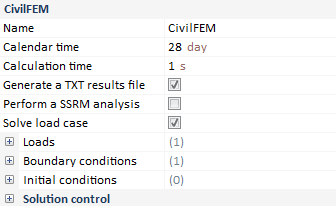
TXT file: In order to use a TXT file, the user must solve the model first, defining the loads that are part of the initial state of the system and checking the "Generate a TXT results file" option under each Load Case. This file can then be edited using a text editor such as Notepad (BEWARE, MS Word or other text processors should not be used as their output is not a pure ASCII text file). The user can remove elements and change stress values inside this file as long as the structure of the file doesn't change. The labels for the different sections must be present so the file parsing won't fail. This txt file should be saved with a different name so it won't be overwritten by a subsequent solve. This method is more flexible than the T16 one, as the user can select which elements will be affected by deleting whole blocks of elements, and even the stress values can be changed. Various points must be taken into consideration:
The use of cable elements in an initial stress case is not advised as it can lead to incorrect results.
The use of multi-linear materials in an initial stress case is not advised as it can lead to incorrect results.
Only the Stress checkbox will be available. The user won't be able to select the Displacement option.
Results from models with springs or imposed displacements in the first load case might not correspond to the expected initial state, as the TXT initial stress only takes stresses into consideration. Displacements can't be imported.
The initial stress will be applied as an instantaneous load, so the user should select "Instantaneous" under the Solver configuration options.
Stresses check
Include stresses of initial state
If "Stress" option is activated, CivilFEM will apply stresses from the loaded file.